
How to Choose a Database in 2026
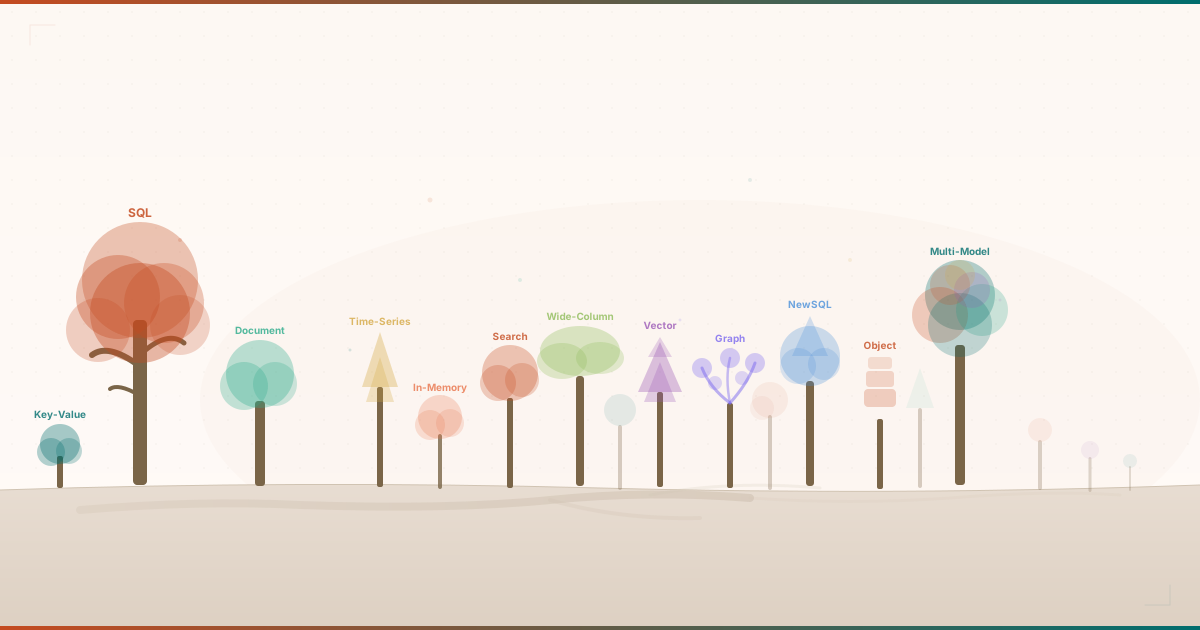
Ten years ago, choosing a database was straightforward. You picked PostgreSQL or MySQL for most things, Redis if you needed a cache, and maybe MongoDB if you were feeling adventurous. The decision tree had three or four branches.
That tree is now a forest.
In 2026, there are at least 12 distinct database model categories in active production use. Key-value stores that respond in microseconds. Document databases that store JSON without schemas. Vector databases purpose-built for AI embeddings. Graph databases that traverse relationships in constant time. Wide-column stores that ingest millions of writes per second. Multi-model databases that try to do everything at once.
Each category has its own strengths, tradeoffs, and failure modes. Each has a handful of production-grade implementations competing for your attention. And each vendor will happily tell you that their database is the right choice for your workload.
After 17 years of building cloud-native systems (running production databases across almost every major cloud provider, and debugging more data-layer incidents than I care to count), I wanted a structured way to evaluate these options. Not a vendor comparison. Not a benchmark shootout. A framework for thinking about database selection that accounts for the dimensions that actually matter in production.
That framework is the Database Compass. It scores 12 database model categories across 8 dimensions, placing each on a complexity spectrum from the simplest (key-value stores) to the most versatile (multi-model databases). This post walks through the thinking behind it.
The 8 Dimensions That Matter
Most database comparisons focus on a single axis: performance benchmarks, or feature checklists, or pricing tables. None of these tell you what it actually feels like to operate a database in production over months and years. A benchmark tells you how fast a database can insert rows on a machine you do not own. It tells you nothing about what happens when your on-call engineer gets paged at 3 AM because a shard is hot.
The Database Compass evaluates each model across 8 dimensions, split into two groups.
Operational dimensions measure what happens after you deploy:
-
Scalability: How well does it handle growth? Can you add capacity horizontally, or are you stuck scaling vertically until you hit a ceiling? A key-value store like Redis scales almost linearly with consistent hashing. A relational database requires careful sharding or a move to distributed SQL.
-
Performance: Raw speed under your expected access patterns. Sub-millisecond reads from an in-memory store are meaningless if your workload is complex joins across normalized tables. Performance is always relative to the query shape.
-
Reliability: ACID transactions, durability guarantees, replication, and recovery. A financial system needs serializable isolation. A caching layer can tolerate data loss on restart. The score reflects how much you can trust the database with data you cannot afford to lose.
-
Operational Simplicity: How much expertise does it take to keep things running? Some databases are deploy-and-forget. Others require a dedicated team to manage compaction, tombstones, shard rebalancing, and JVM tuning. This dimension measures the ongoing operational tax.
Developer dimensions measure the experience of building against the database:
-
Query Flexibility: What questions can you ask your data? SQL databases score highest here because joins, window functions, CTEs, and subqueries let you express almost anything. Key-value stores score lowest because the only question you can ask is “give me the value for this key.”
-
Schema Flexibility: How easily can your data model evolve? Document databases let you change the shape of your data without migrations. Relational databases require
ALTER TABLEand careful migration strategies. This matters most in early development when your schema is still finding its shape. -
Ecosystem Maturity: Drivers, tools, community, documentation, managed service offerings, and the size of the talent pool. PostgreSQL has decades of ecosystem behind it. Vector databases launched after 2020 and are still building theirs.
-
Learning Curve: How quickly can a competent developer become productive?
GET key/SET key valuetakes five minutes to learn. Graph traversal queries in Cypher require a paradigm shift from tabular thinking that takes weeks.
Each dimension is scored from 1 to 10. The total possible score is 80. No database model scores perfectly across all eight, and that is exactly the point. Every database is a set of tradeoffs, and the framework makes those tradeoffs visible.
The Complexity Spectrum
One of the most useful mental models in the Database Compass is the complexity spectrum. It arranges all 12 categories from simplest to most complex based on their operational and conceptual footprint.
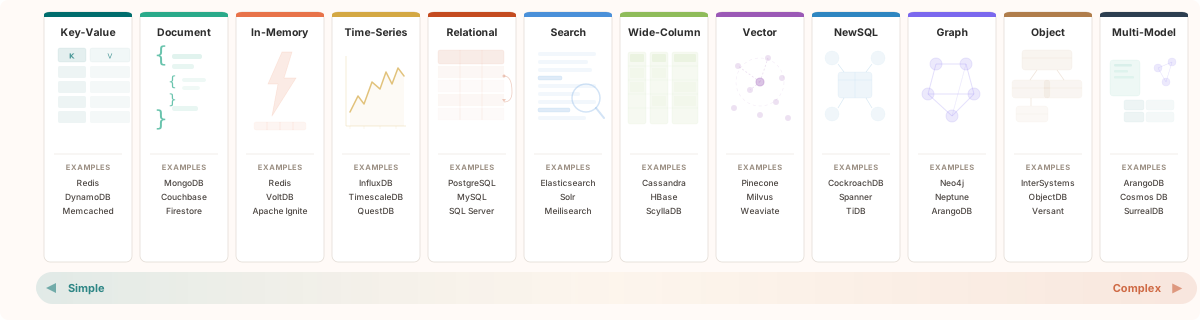
At the simple end sit key-value stores. The data model is a hash map: keys map to values, and the API is GET, SET, DELETE. There is nothing to misunderstand. The tradeoff is that you cannot ask any question that does not start with “give me the value for this exact key.” If your access pattern fits, nothing is faster. If it does not, no amount of optimization will help.
At the complex end sit multi-model databases like ArangoDB, Azure Cosmos DB, and SurrealDB. These combine document, graph, key-value, and search capabilities in a single engine. They promise to eliminate polyglot persistence (the operational overhead of running multiple database systems). The tradeoff is that you need to understand multiple data models, their query languages, and when to use each. They are competent across models but rarely best-in-class for any single one.
The spectrum is not a quality ranking. Simple is not better or worse than complex. A key-value store is the right choice for session caching. A multi-model database is the right choice for an application with genuinely diverse access patterns.
Between these extremes sit 10 other categories, each occupying its own niche: document databases, in-memory databases, time-series databases, relational databases, search engines, wide-column stores, vector databases, NewSQL databases, graph databases, and object-oriented databases. The spectrum helps you understand the operational commitment each category requires and where your use case lands.
Five Database Models Every Architect Should Know
The 12 categories in the Database Compass span a wide range, but five of them cover the most common production scenarios. If you are building a new system, at least one of these will end up in your architecture.
Key-Value Stores: The Speed Champions
Key-value stores like Redis, Memcached, and DynamoDB are the simplest and fastest database model. Sub-millisecond reads are the norm, not the exception. Redis achieves this by keeping everything in memory with O(1) hash lookups that eliminate query planning entirely.
The ideal use case is anything where you know the key at query time: session storage, application caching, feature flags, rate limiting, real-time leaderboards.
The anti-pattern is anything that requires filtering, joining, or searching by value. If you find yourself scanning the entire keyspace to answer a question, you have picked the wrong model.
Key-value stores score 9/10 on performance and learning curve, but just 2/10 on query flexibility. That is the fundamental tradeoff: maximum speed, minimum expressiveness.
Relational (SQL) Databases: The Proven Workhorse
Relational databases like PostgreSQL, MySQL, and SQL Server have been the backbone of application development for decades, and for good reason. SQL is the most expressive query language in the database world: joins across tables, window functions, CTEs, aggregations, and full-text search. The query optimizer has had 40 years of engineering investment.
The reliability story is equally strong. ACID transactions, write-ahead logging, point-in-time recovery, and decades of battle-hardening make relational databases the gold standard for data integrity. When a financial system needs to guarantee that a debit and credit either both happen or neither does, there is no substitute.
Where relational databases struggle is horizontal scaling. Traditional SQL databases scale vertically (bigger machine) rather than horizontally (more machines). PostgreSQL with read replicas handles enormous read loads, but write-heavy workloads at massive scale require distributed SQL solutions like CockroachDB or Google Spanner, which is an entirely different category (NewSQL).
Relational databases score 10/10 on both query flexibility and ecosystem maturity. No other model comes close on either dimension. PostgreSQL in particular has become the Swiss Army knife of the relational world, with extensions for JSON documents (jsonb), geospatial queries (PostGIS), full-text search, and even time-series data (TimescaleDB).
Document Databases: Schema Flexibility for Modern Apps
Document databases like MongoDB, Couchbase, and Firestore store data as self-contained JSON documents. The key advantage is schema flexibility: documents in the same collection can have completely different structures, and adding new fields requires zero downtime migrations.
This makes document databases the natural choice for rapid prototyping, content management systems, product catalogs with varying attributes, and any domain where the data shape evolves frequently. The natural mapping between JSON documents and application-layer objects eliminates the object-relational impedance mismatch that has plagued SQL-based development for decades.
The tradeoff is cross-document operations. Joins across collections are expensive. MongoDB’s $lookup performs a server-side left outer join, but it is noticeably slower and less flexible than a native SQL join. Multi-document ACID transactions are supported in recent MongoDB versions but add latency and complexity.
If your data has deep relational dependencies requiring frequent joins across entities, a document database will fight you at every turn.
Graph Databases: When Relationships Are the Data
Graph databases like Neo4j, Amazon Neptune, and ArangoDB model data as nodes and edges with properties on both. The killer feature is index-free adjacency: traversing a relationship is O(1) regardless of graph size. In a social network with 100 million users, finding a user’s friends-of-friends takes the same time as in a network with 100 users.
The use cases where graph databases shine are the ones where relational databases struggle: social networks, fraud detection, knowledge graphs, network topology analysis, and recommendation engines.
A query like “find all accounts that share a phone number with an account that was flagged for fraud in the last 30 days” requires recursive CTEs in SQL but is a simple two-hop traversal in Cypher.
The tradeoff is scalability. Graphs are inherently difficult to partition because splitting a highly connected graph across machines creates expensive cross-partition hops. Neo4j scales reads via replicas, but writes are bottlenecked by the leader node.
If your workload is primarily tabular analytics or bulk aggregations, a graph database is the wrong tool.
Vector Databases: The AI Era’s Newcomer
Vector databases like Pinecone, Milvus, Weaviate, and Qdrant are the newest category in the compass and the fastest growing. They store high-dimensional vector embeddings and use approximate nearest neighbor (ANN) algorithms to find similar items in sub-millisecond time.
If you are building anything with large language models (retrieval-augmented generation, semantic search, image similarity, or recommendation systems based on embeddings), a vector database is the retrieval layer. The workflow is straightforward: convert your data into embeddings using a model like OpenAI’s text-embedding-3-large, index them in a vector database, and query by similarity rather than exact match.
The tradeoff is maturity. Most vector databases launched after 2020. The ecosystem is young, best practices are still forming, and the reliability story is less proven than relational databases with decades of production hardening.
Vector databases score 3/10 on ecosystem maturity, the lowest of any category. They also score 3/10 on query flexibility, because the only question you can really ask is “what is similar to this vector?”
If that is the right question, nothing else comes close. If it is not, look elsewhere.
CAP Theorem in Practice
No discussion of database selection is complete without addressing the CAP theorem. Eric Brewer formalized what distributed systems engineers already knew from experience: in any distributed system, you can have at most two of three guarantees:
- Consistency: every read returns the most recent write
- Availability: every request receives a response
- Partition tolerance: the system continues operating during network splits
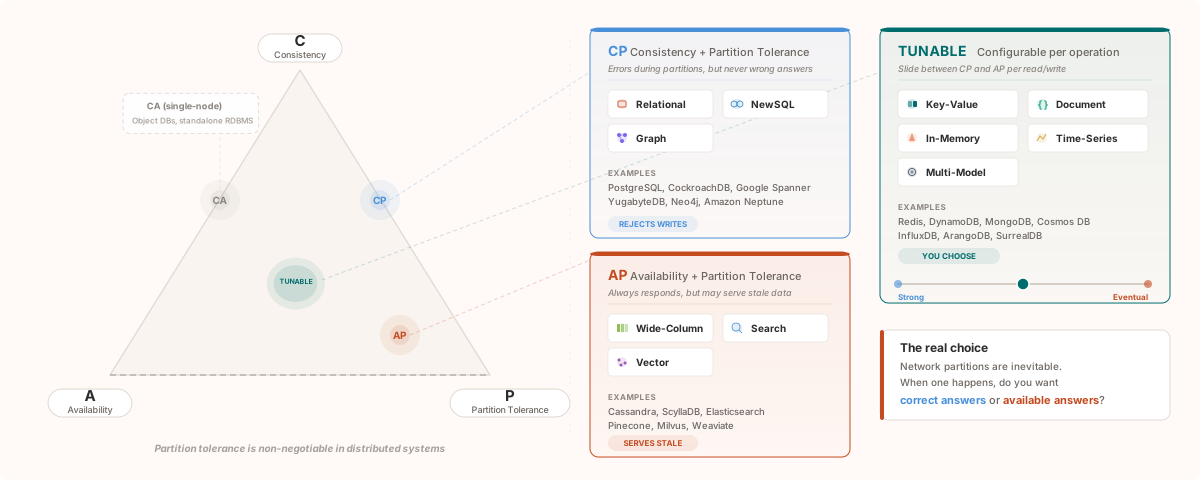
In practice, partition tolerance is non-negotiable for any distributed database. Network splits happen. Cloud providers experience them. Cross-region links drop. The question is not whether partitions will occur, but how your database behaves when they do. So the real choice is between consistency and availability during a partition:
-
CP systems (consistency + partition tolerance) like relational databases and NewSQL databases will reject writes or become unavailable rather than serve stale data. CockroachDB and Google Spanner choose this path. Your application gets errors during a partition, but it never gets wrong answers.
-
AP systems (availability + partition tolerance) like wide-column stores and search engines will continue serving requests during a partition, even if some reads return stale data. Cassandra and Elasticsearch choose this path. Your application stays up, but it might serve yesterday’s data.
-
Tunable systems like key-value stores, document databases, and multi-model databases let you configure the consistency-availability tradeoff per operation. DynamoDB lets you choose eventual or strong consistency on each read. Cosmos DB offers five consistency levels from strong to eventual.
The Database Compass shows the CAP classification for each model category. It is one of the first things I check when evaluating a database for a new workload: does the system’s consistency model match my application’s tolerance for stale reads?
How to Use the Database Compass
The Database Compass is designed to be explored, not just read. Here is how I recommend using it.
Start with the complexity spectrum at the top of the overview page. It positions all 12 categories on a horizontal axis from simple to complex. This gives you an immediate sense of the operational commitment each category requires. If you are a small team without a dedicated DBA, you probably want to stay on the left side of the spectrum.
Use the use-case filter to narrow the grid. If you are building a caching layer, select “Caching” and the filter highlights which models match that pattern. If you are building a RAG pipeline, select “Semantic search” to find vector databases and search engines. The filter maps 58 real-world use cases to the 12 model categories.
Click into any model detail page to see the full picture: a radar chart showing the 8-dimension scoring profile, a score breakdown with justifications for each rating, the CAP theorem classification, strength and weakness analysis, best-for and avoid-when guidance, and top databases in the category with licensing details.
Sort the scoring table on the overview page by any dimension. Want the most scalable model? Sort by scalability. Want the easiest to learn? Sort by learning curve. The table makes cross-category comparison immediate and lets you weight the dimensions that matter most for your specific situation.
Every score is my editorial judgment, informed by 17 years of building production systems on these databases. You will disagree with some of them. That is the point. A framework for productive disagreement is more useful than a framework everyone agrees with.
Explore the Database Compass to compare all 12 models across 8 dimensions.