
The Context Window Is the Product
I have watched dozens of developers pick up Claude Code over the past year. The ones who struggle all make the same mistake: they treat it like a chat box with shell access. They type a request, get output, and move on. When the output is wrong, they type a longer request. When the longer request is incorrect, they try rephrasing it. Eventually, they decide the tool is not ready for production work.
The developers who get 10x results do something fundamentally different. They treat the context window as a product they actively design and develop. Their CLAUDE.md files are not afterthoughts. They are carefully crafted briefing documents that clearly outline to the agent what this project entails, its structure, and the conventions to follow. Their skill definitions are not boilerplate. They are reusable capabilities that encode team conventions, invoked by slash command or discovered automatically when relevant. Their hook configurations are not copied and pasted examples. They are automated guardrails that lint code before commits, block dangerous commands before execution, and log every tool invocation to an audit system. Every one of these artifacts is a product designed to shape what the agent sees and how it behaves.
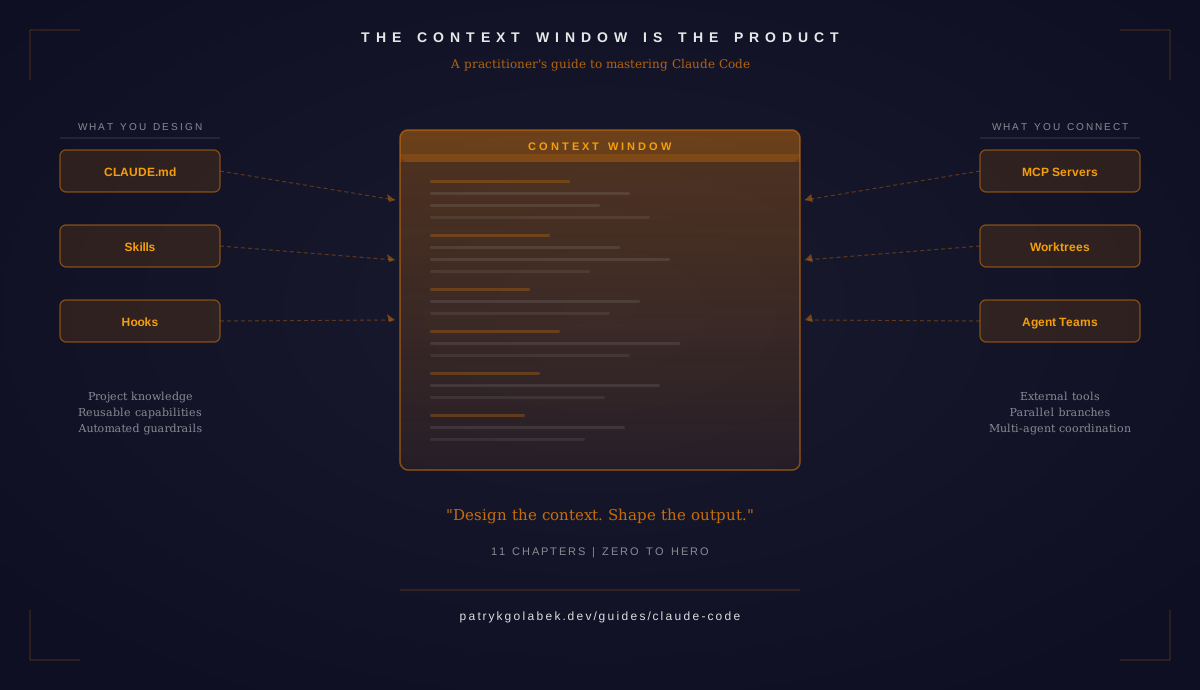
This is the insight that separates casual users from practitioners: the context window is not a limitation to work around. It is the primary interface you control. Every token that enters the context window influences the agent’s decisions, the files it reads, the commands it runs, the patterns it follows, and the mistakes it avoids. CLAUDE.md files, skill definitions, hook automations, MCP server connections, and worktree configurations are all inputs to the context window. The developer who designs these inputs deliberately gets dramatically better results than the developer who types bare prompts into an empty session.
Think about it this way. When you prompt Claude Code without a project context, the agent must guess your conventions. It guesses your test framework, import style, error handling patterns, and directory structure. Sometimes it guesses right. Often it does not. But when you design a CLAUDE.md that specifies all of these up front, the agent stops guessing and starts following. The same principle applies at every layer: skills instruct the agent on which workflows to follow, hooks indicate which automation to trigger, MCP servers inform it about which external tools to utilize, and worktree configurations specify how to parallelize work across branches. Each layer reduces guesswork and increases determinism.
I wrote the Claude Code Guide to teach this approach across 11 chapters, from first installation through multi-agent orchestration. Each chapter addresses a different aspect of the context window: what the agent knows about your project, what it costs to run, what tools it can access, what happens automatically around its actions, and how the work scales across parallel sessions. This post introduces each chapter and the key insight it delivers.
Introduction and Getting Started
Claude Code is not a chat assistant. It is an agentic tool that reads your entire codebase, edits files, runs commands, and verifies its own work through a three-phase loop: gather context, take action, verify results. Understanding this agentic loop is the foundation for everything that follows, because every optimization in later chapters builds on this mental model. The introduction chapter walks through installation across all interfaces (terminal CLI, VS Code, JetBrains, desktop app, and web), the core tool set Claude Code uses to interact with your project (Read, Write, Edit, Bash, Glob, Grep), and a complete first session from start to finish. You will learn the mechanics of how the agent operates before you learn how to shape its behaviour.
Read the full Introduction chapter
Project Context and Memory
CLAUDE.md is the single highest-leverage file in your entire Claude Code workflow. It is the briefing document the agent reads before processing your first prompt, and it determines whether Claude Code understands your project’s conventions, tech stack, and constraints from the start or discovers them slowly through trial and error. This chapter covers the four-tier CLAUDE.md hierarchy (project root, subdirectory, user-level, enterprise), path-specific rules that apply only when the agent reads files in certain directories, the auto-memory system that lets Claude Code learn and persist context across sessions, and file exclusion patterns that keep irrelevant content out of the context window. The difference between a project with a well-crafted CLAUDE.md and one without is the difference between an agent that follows your conventions and one that invents its own.
Read the full Context Management chapter
Models, Cost Economics, and Permissions
Different tasks require different models. Sonnet handles daily coding with the best speed-quality-cost balance. Opus delivers deeper reasoning for architectural decisions and complex refactoring. Haiku answers quick questions at a fraction of the cost. Understanding these tradeoffs, along with effort levels that control reasoning depth within a model, is the single most impactful economic decision you make. This chapter also covers the permission system that governs what Claude Code can do on your machine, the three-tier deny-ask-allow evaluation chain that determines whether a tool runs automatically, prompts for approval, or is blocked entirely. Mastering cost and permissions means you can run Claude Code confidently on production codebases without worrying about runaway spending or unauthorized actions.
Read the full Models and Costs chapter
Environment Sandboxing and Customization
Claude Code operates under a four-tier configuration system that spans enterprise managed settings, user level defaults, project-level settings, and per-session overrides. Higher tiers override lower ones, and managed settings cannot be weakened by any other tier. This chapter covers how settings cascade and override each other, how sandbox modes (macOS Seatbelt and Linux containers) isolate the agent’s access to your filesystem and network, and how environment variables and the terminal status line let you customize the development experience. For teams, the environment chapter explains how to enforce security boundaries that prevent developers from disabling sandboxing, relaxing permissions, or bypassing audit hooks, a critical requirement for any organization deploying Claude Code across engineering teams.
Read the full Environment chapter
Remote Control and Headless Automation
Claude Code does not have to run in an interactive terminal session. The remote control feature lets you access a local Claude Code session from any device, a phone, tablet, or laptop, over HTTPS without opening inbound ports or configuring a VPN. The headless mode runs Claude Code programmatically with the -p flag for CI/CD pipelines, shell scripts, and automated workflows where no human is present. Cron scheduling lets you set up recurring tasks that run on a timer without manual intervention. This chapter covers the operational patterns that take Claude Code from a developer tool to an automation platform, running code reviews on every pull request, generating architecture reports on schedules, processing support tickets overnight, and executing multi-step agentic workflows without human supervision.
Read the full Remote and Headless chapter
Model Context Protocol
MCP is the open standard for connecting Claude Code to external tools beyond the local filesystem. Without MCP, the agent reads files, searches code, and runs shell commands, everything stays inside the repository. With MCP, it queries a PostgreSQL database, creates tickets in Jira, searches documentation in a knowledge base, deploys to a staging environment, or calls any API you connect. This chapter covers the three transport modes (stdio for local servers, HTTP for remote servers, and the deprecated SSE), scope-based server configuration that controls which servers are available at the user, project, and managed levels, the .mcp.json file for sharing server configurations across your team, and tool search for discovering MCP servers from registries. MCP is how you extend what the context window can reach beyond the repository, the external tools that complete the agent’s capabilities.
Custom Skills
Skills are reusable instruction sets packaged as SKILL.md files. Each skill has YAML frontmatter for configuration and a markdown body with instructions the agent follows when invoked. You can invoke a skill as a slash command, let the agent auto-discover it when relevant, or both. Skills can restrict which tools the agent uses, override the model, run in isolated subagents, and embed their own hook configurations. This chapter covers the ten frontmatter fields, the four storage locations where skills can live, string substitutions for dynamic content, and the bundled skills that ship with Claude Code. Skills are how you encode team conventions and specialized workflows as reusable, shareable artifacts rather than tribal knowledge.
Read the full Custom Skills chapter
Hooks and Lifecycle Automation
Hooks fire shell commands at specific points in the Claude Code lifecycle. There are 18 lifecycle events across three categories: session events that bookend the overall interaction, loop events that fire during the agentic cycle, and standalone events that fire independently. The PreToolUse event is particularly powerful, it fires before any tool executes and can block the action entirely based on the exit code. This means you can lint code before Claude Code commits it, block dangerous shell commands before they execute, validate file edits before they are written, and log every tool invocation to an audit system. Hooks are CI-style automation embedded directly in the agentic workflow, triggering immediately rather than waiting for a push to a pipeline.
Git Worktrees and Subagent Delegation
Subagents are specialized AI assistants that run within a Claude Code session. Each subagent has its own context, tools, and permissions, and critically, it can operate in its own git worktree so it never conflicts with the files you or other subagents are editing. The three built-in subagents (Explore for cheap read-only investigation, Plan for thorough analysis without modifications, and general-purpose for full task delegation) cover the most common delegation patterns. Custom subagents, defined through AGENT.md files with YAML frontmatter, let you create purpose-built personas for code review, security scanning, documentation generation, and other specialized tasks. Git worktree isolation is the key enabler for parallel development, each subagent works in its own branch checkout, making changes independently without merge conflicts. Worktrees combined with subagents let you parallelize work across multiple branches within a single Claude Code session, turning sequential workflows into concurrent ones.
Read the full Worktrees chapter
Agent Teams and Advanced Orchestration
Agent teams take parallelism to a different scale. Where subagents are single-session delegation (a parent spawns a subagent and it reports back), agent teams are multi-session coordination where independent Claude Code instances work together on a shared task list with direct communication between teammates. A lead agent decomposes the work into tasks, teammates claim and execute those tasks in parallel, and a mailbox system enables peer-to-peer communication without routing through a central coordinator. This chapter covers the team architecture, the three display modes for monitoring team activity (panel, split, and hidden), task management with dependency tracking so work executes in the right order, and a detailed comparison with subagents across eight dimensions. Agent teams are currently a research preview feature, require an environment flag to enable, and consume significantly more tokens than single-session work, but for large tasks that decompose naturally into parallel workstreams, they deliver results that serial execution cannot match.
Read the full Agent Teams chapter
Security and Enterprise Administration
Deploying Claude Code across an organization requires governance controls that individual developers cannot override. This chapter covers the security model’s three layers (built-in protections, configurable permissions, enterprise governance), the five managed settings delivery mechanisms (server-managed, macOS MDM, Windows registry, Linux config, and environment variables), and the governance controls for permissions, hooks, MCP servers, and plugins. It also covers vulnerability scanning as a capability pattern that combines subagents, skills, and hooks rather than a standalone feature. For team leads and security engineers, this chapter answers the question: how do I deploy Claude Code securely at scale?
Read the full Security chapter
How to Use This Guide
There is no single correct reading order. Here are three recommended paths based on your experience level.
New to Claude Code (Chapters 1-4, the foundation path). Start with the Introduction to understand the agentic loop, then Context Management to set up your CLAUDE.md, then Models and Costs to choose the right model, then Environment to configure sandboxing. These four chapters give you everything needed for productive daily use.
Adding Claude Code to an existing workflow (Chapters 6-8, the extensibility path). If you already use Claude Code and want to extend it, start with MCP to connect external tools, then Custom Skills to encode your team’s workflows, then Hooks to automate quality enforcement. These three chapters turn Claude Code from a coding assistant into an automated development platform.
Team leads and architects (Chapters 9-11, the scale and governance path). Start with Worktrees to parallelize work across branches, then Agent Teams to coordinate multiple instances, then Security to enforce governance policies. These three chapters cover everything needed to deploy Claude Code at organizational scale.
The full guide is at the Claude Code Guide landing page.
Design Your Context Window
The developers who master Claude Code are not prompt engineers. They are context engineers.
Each chapter in the guide teaches a different lever for shaping the agent’s context window. CLAUDE.md shapes what the agent knows about your project, its conventions, tech stack, directory structure, and constraints. Models and permissions shape what the agent costs and what it is allowed to do on your machine. Environmental settings shape the security boundaries in which it operates. Skills shape what the agent can do by encoding reusable capabilities as shareable artifacts. Hooks shape what happens automatically around the agent’s actions, linting before commits, blocking dangerous commands, logging tool invocations, and notifying on completion. MCP shapes what external tools the agent can access beyond the local filesystem. Worktrees and agent teams shape how the work parallelizes across branches and sessions.
None of these are prompt tricks. They are engineering decisions. You design CLAUDE.md files like you design configuration files: deliberately, with version control, reviewed by your team. You design skills like you design libraries: reusable, tested, documented, shared across projects. You design hooks like you design CI pipelines: automated checks that run every time, without human intervention. You configure MCP servers like you configure infrastructure: connecting the right tools for the right job, scoped to the right level of access.
The AI coding assistant landscape is moving fast. New tools appear every month. But the fundamental insight does not change: the quality of an agentic workflow depends on the quality of the context that feeds it. Better context produces better results. Designed context produces designed results. Random context produces random results.
The context window is the product. Design it well, and Claude Code becomes a force multiplier that scales with your ambitions. Leave it to chance, and you are just typing into a chat box.
Start building your context window: Claude Code Guide.